Introduction
SaaS, PaaS, and IaaS are the three core cloud computing service models, each designed to provide a different level of control, flexibility, and responsibility. The primary difference between them lies in how much of the technology stack is managed by the cloud provider versus your own team.
Software as a Service (SaaS) delivers fully managed, ready-to-use applications that require little to no infrastructure management. Platform as a Service (PaaS) provides developers with a complete environment to build, test, deploy, and manage applications without worrying about the underlying infrastructure. Infrastructure as a Service (IaaS) offers virtualized computing resources including servers, storage, and networking giving organizations maximum control over their operating systems, applications, and configurations.
In this comparison, you'll learn how SaaS, PaaS, and IaaS differ, what each service model includes, who is responsible for managing each layer of the technology stack, real-world examples of each, and how to determine which cloud model best aligns with your business and technical requirements.
The Core Difference: Who Manages What
The easiest way to distinguish SaaS, PaaS, and IaaS is by understanding who is responsible for managing each layer of the technology stack. As you move from SaaS → PaaS → IaaS, your level of control and management responsibility increases.
| Layer | IaaS | PaaS | SaaS |
|---|
| Applications | You manage | You manage | Provider manages |
| Data | You manage | You manage | You manage (within the app) |
| Runtime | You manage | Provider manages | Provider manages |
| Middleware | You manage | Provider manages | Provider manages |
| Operating System | You manage | Provider manages | Provider manages |
| Virtualization | Provider manages | Provider manages | Provider manages |
| Servers | Provider manages | Provider manages | Provider manages |
| Storage & Networking | Provider manages | Provider manages | Provider manages |
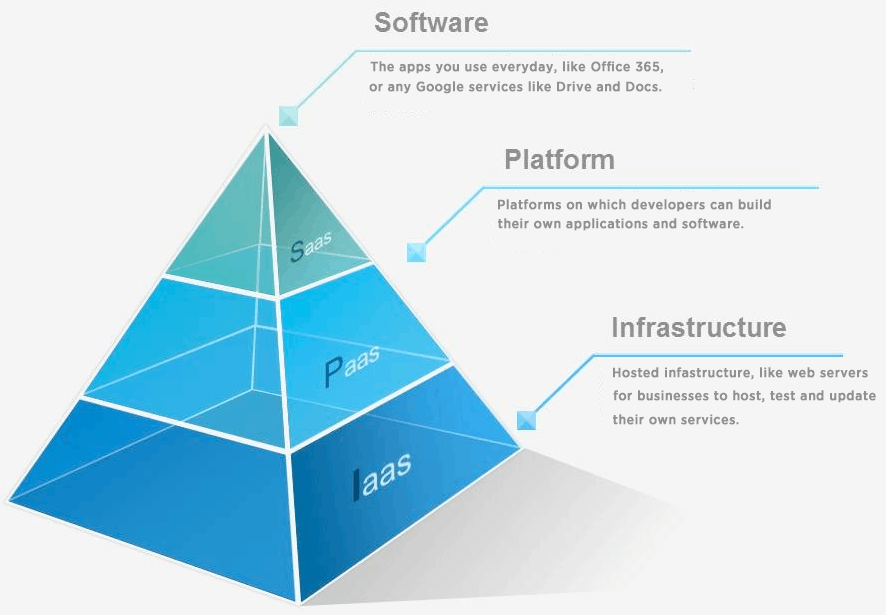
What Is IaaS (Infrastructure as a Service)?
Infrastructure as a Service (IaaS) is the most fundamental cloud computing model, providing businesses with virtualized computing resources—including servers, storage, networking, and virtualization over the internet. Instead of investing in and maintaining physical hardware, organizations can provision infrastructure on demand and pay only for the resources they consume.
Unlike other cloud service models, IaaS gives you the highest level of control. While the cloud provider manages the underlying physical infrastructure, you are responsible for configuring and maintaining the operating system, middleware, runtime environment, applications, and data. This flexibility makes IaaS an excellent choice for organizations with complex workloads, strict compliance requirements, or highly customized environments.
Best For
Businesses migrating on-premises infrastructure to the cloud
Hosting custom enterprise applications
Disaster recovery and backup solutions
High-performance computing (HPC)
Organizations requiring maximum infrastructure flexibility and control
Popular IaaS Providers
What Is PaaS (Platform as a Service)?
Platform as a Service (PaaS) provides a complete cloud-based development environment that enables developers to build, test, deploy, and manage applications without worrying about servers or infrastructure. The provider manages the operating system, runtime, middleware, scaling, and maintenance, allowing development teams to focus entirely on writing code and delivering features faster.
By eliminating infrastructure management, PaaS accelerates application development, simplifies deployment, and improves collaboration between development teams. It is particularly valuable for organizations that want to shorten development cycles while reducing operational overhead.
Best For
Software development teams
Web and mobile application development
Rapid prototyping and product launches
DevOps and CI/CD workflows
Businesses that want faster development without infrastructure management
Popular PaaS Providers
What Is SaaS (Software as a Service)?
Software as a Service (SaaS) is the most widely used cloud computing model, delivering fully functional software applications over the internet through a web browser or mobile app. The provider manages everything behind the scenes including infrastructure, platform, security, updates, maintenance, and availability so users can simply sign in and start working.
Because there is no software to install or infrastructure to manage, SaaS offers the fastest and simplest way to adopt cloud-based applications. From email and collaboration tools to CRM, accounting, and project management platforms, SaaS has become the standard for modern business software.
Best For
Businesses seeking ready-to-use software
Teams with limited IT resources
Organizations adopting subscription-based applications
End users who want quick, secure access from any device
Popular SaaS Applications
Salesforce
Google Workspace
Microsoft 365
Slack
Dropbox
HubSpot
Zoom
Side-by-Side Comparison: IaaS vs. PaaS vs. SaaS
Choosing between IaaS, PaaS, and SaaS depends on how much control, flexibility, and management responsibility your organization requires. The table below highlights the key differences across the most important factors.
| Factor | IaaS (Infrastructure as a Service) | PaaS (Platform as a Service) | SaaS (Software as a Service) |
|---|
| What You Get | Virtualized infrastructure, including servers, storage, and networking | A fully managed application development and deployment platform | A complete, ready-to-use software application |
| Who Uses It | IT administrators, infrastructure engineers, and DevOps teams | Software developers and engineering teams | End users, business teams, and organizations |
| Control Level | Highest - complete control over the operating system, applications, and configurations | Moderate - control over application code and data, while the provider manages the platform | Lowest - limited to application settings, users, and data within the software |
| Setup Complexity | High - requires infrastructure planning, configuration, and management | Moderate - requires application configuration with minimal infrastructure management | Low - ready to use with little or no setup required |
| Maintenance Responsibility | You manage the operating system, middleware, runtime, applications, and updates | The provider manages the infrastructure, operating system, and runtime; you manage the application and data | The provider manages the entire technology stack, including updates, security, and maintenance |
| Example Providers | AWS EC2, Microsoft Azure Virtual Machines, Google Compute Engine | Heroku, Google App Engine, Microsoft Azure App Service | Salesforce, Google Workspace, Slack, HubSpot |
How to Choose the Right Cloud Service Model
The right cloud service model depends on your organization's technical requirements, available resources, and business goals. Each model serves a different purpose, and the best choice is determined by the level of control and management you need.
Choose IaaS if:
You need complete control over your infrastructure, operating systems, and applications. IaaS is ideal for organizations with experienced IT or DevOps teams, businesses migrating existing on-premises workloads, or companies running highly customized environments that require maximum flexibility.
Choose PaaS if:
Your focus is on developing and deploying applications quickly without managing servers or infrastructure. PaaS is best suited for development teams that want to accelerate software delivery while leaving infrastructure management, scaling, and maintenance to the cloud provider.
Choose SaaS if:
You need fully functional software that's ready to use with minimal setup. SaaS is the best choice for organizations looking to adopt business applications such as CRM, email, collaboration, accounting, or productivity tools without worrying about infrastructure, maintenance, or software updates.
In practice, most organizations don't rely on just one cloud service model. It's common to use IaaS for infrastructure-intensive workloads, PaaS for application development, and SaaS for everyday business applications such as email, customer relationship management, and team collaboration. Rather than being competing options, these models often work together as complementary layers within a modern cloud strategy.
Conclusion
SaaS, PaaS, and IaaS each represent a different approach to cloud computing, distinguished by how responsibilities are shared between the cloud provider and the customer. IaaS offers the greatest flexibility and control but requires the most management. PaaS simplifies application development by removing infrastructure management, allowing developers to focus on building software. SaaS provides fully managed, ready-to-use applications, making it the easiest and fastest option for businesses and end users.
The right choice ultimately depends on your organization's specific needs. While some businesses may rely primarily on one model, many combine all three to create a scalable, efficient, and cost-effective cloud ecosystem that supports both day-to-day operations and long-term growth.